Mid-Career Two-Page Resume: 5 Elements to Earn the Scroll
Mid-Career Two-Page Resume: 5 Elements to Earn the Scroll

A two-page resume is fine when every line on page two strengthens your case. If it doesn’t, cut it. As a rule of thumb, you’re likely in two-page territory once you have substantial experience, a technical or senior role, or credentials like certifications and publications worth listing. Keep the formatting clean, repeat your header on page two, and stay consistent with fonts and margins throughout.
TL;DR:
- For professionals with more than 7 to 10 years of experience or specialized roles, a two-page resume is justified if it includes key certifications, metrics, or projects that demonstrate expertise; otherwise, it risks unnecessary padding.
- The top third of the first page should feature a clear, impactful summary and achievements, as recruiters typically spend the most time reviewing this section before scrolling.
- Consistent formatting, header repetition, and careful organization are essential to creating a clean two-page resume that looks deliberate and professional, not cluttered or sloppy.
- Content related to roles older than 15 years, or generic skills and duties, should be trimmed, focusing instead on recent accomplishments and relevant credentials that support the job target.
- Use tools like resume analysis software to help determine whether your resume benefits from an additional page or is overly lengthy with filler, ensuring every line adds proof of your suitability.
Table of Contents
- When Is a Two-Page Resume the Right Choice?
- How Do You Structure Page One to Earn the Scroll?
- What Formatting Rules Keep a Two-Page Resume Clean?
- What Should You Cut vs. Keep When Trimming a Resume?
- Do Technical, Academic, or Executive Resumes Follow Different Rules?
- What Do Two Sample Layouts and a Formatting Checklist Look Like?
- How Do You Carry the Story From Page One to Page Two?
- How Should You Tailor a Two-Page Resume by Industry?
- How Do You Balance Detail With Brevity Across Both Pages?
- How Do You Handle Employment Gaps or Career Changes on Two Pages?
- Why Content Beats Page Count in a Recruiter’s Eyes
- How Resume-match Helps You Decide Between One Page and Two
- Sources
- FAQ
When Is a Two-Page Resume the Right Choice?
One page remains standard for students, recent graduates, and early-career professionals, generally those with fewer than 7 to 10 years of relevant experience. Once you cross that threshold, career guidance from Coursera points to two pages as the better fit, especially for specialized roles with long tool or technology lists.
Experience alone isn’t the only trigger. Certain roles demand more room no matter how many years you’ve logged:
- Technical and tool-heavy roles — software engineers, data scientists, and IT specialists often need space to list languages, platforms, and certifications that recruiters scan for by name.
- Senior and leadership positions — directors and VPs need room for scope: team size, budget authority, and strategic wins that a single page can’t hold without cramming.
- Roles with publications or licenses — academics, researchers, and licensed professionals (nurses, engineers, attorneys) often have credentials that are non-negotiable to include.
Here’s the simplest test: would a recruiter’s understanding of your fit be measurably weaker without page two? If removing it would cut a certification, a major project, or a metric that proves you can do the job, keep the second page. Otherwise, you don’t need it.
Purdue’s career writing guidance backs this up directly: anyone beyond entry level has a legitimate case for two pages, and the decision should hinge on content, not habit. Career experts increasingly frame the one-page rule as a fit problem rather than a hard limit. The real risk of obsessing over one page is that you start cutting the exact accomplishments recruiters are hunting for, which is a point CNBC’s coverage of resume-length research makes clearly.
How Do You Structure Page One to Earn the Scroll?
Recruiters review resumes on screens, where scrolling costs nothing but attention does. The top third of your first page is the most valuable real estate you have. If it doesn’t sell you fast, nobody reaches page two.
Build that top third in this order:
- Name and contact information — clean, no icons that confuse an ATS parser.
- A one-line headline or brand statement — think “Senior Operations Manager, Supply Chain & Vendor Strategy,” not just a job title.
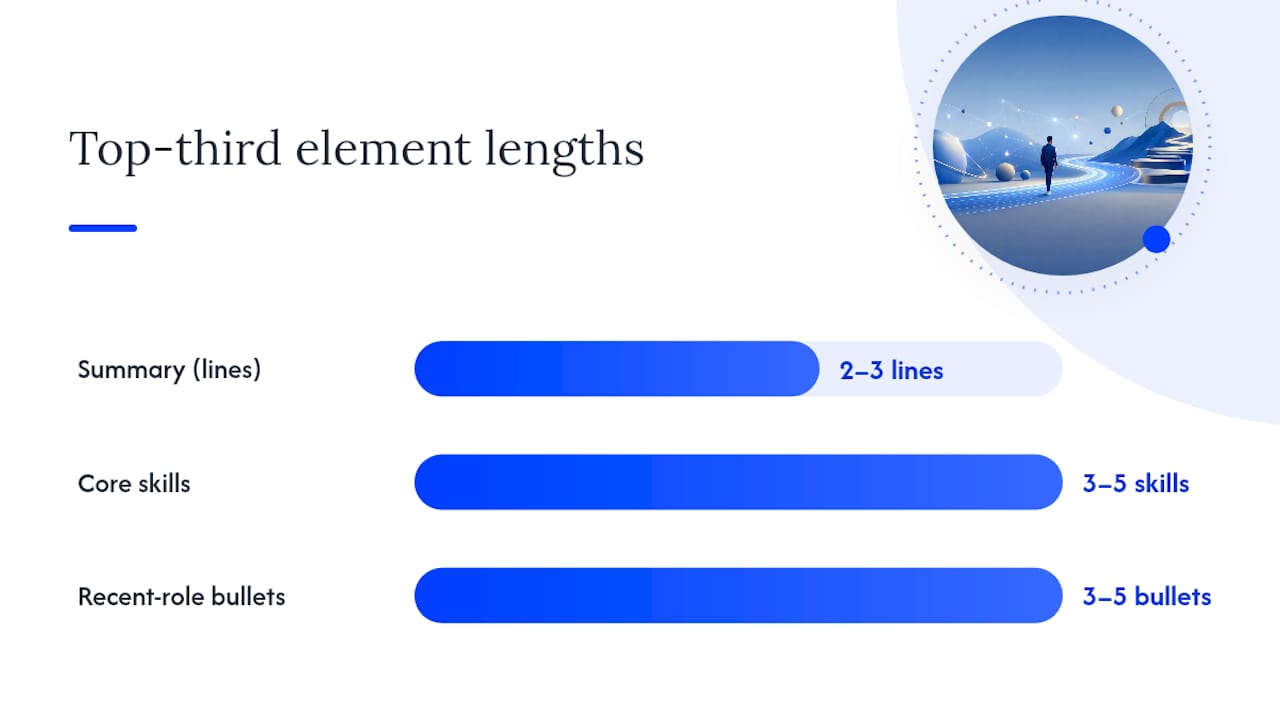
- A 2 to 3-line summary — what you do, what you’re known for, and the scale you operate at.
- 3 to 5 core skills or keywords — pulled straight from the job posting where accurate.
- Your most recent role, with 3 to 5 metric-driven bullets — this is where the case gets made or lost.
That last point matters more than people think. If your current or most recent role’s strongest bullets spill onto page two, you’ve buried your best evidence where half your readers won’t see it. Reorganize so the top achievements from your most recent job stay on page one, even if that means trimming a bullet or two elsewhere.
Skip large graphics, headshots, or a long “career objective” paragraph. They eat space that should go to proof. A resume keyword strategy built around the actual job posting tends to outperform generic skill lists here, since it puts language recruiters and software are both scanning for right at the top.
Pro Tip: Read only your top third out loud to someone unfamiliar with your work. If they can’t guess your role and level within 10 seconds, rework that section before touching anything else.
What Formatting Rules Keep a Two-Page Resume Clean?
Sloppy formatting is what makes hiring managers assume a two-page resume is padded. Clean formatting is what tells them it earned the extra page. Here’s what separates the two:
- Repeat your header on page two — name and contact info, plus a page marker like “Page 1 of 2,” so a printed or separated page never gets lost.
- Keep fonts, margins, and spacing identical across both pages — a size change or margin shift between pages reads as sloppy, even if the content is strong.
- Never break a bullet mid-sentence across the page divide — if a bullet won’t fit cleanly, move the whole thing to page two rather than splitting it.
- Avoid orphan lines — a single bullet stranded alone at the top of page two looks like a formatting accident, not a deliberate choice.
- Choose your file format carefully — a PDF preserves formatting for human readers, but only submit one when the job posting confirms the applicant tracking system can parse it; otherwise, a plain .docx is safer.
On formatting specifically, Zety’s guide to two-page resumes lays out the header-repeat and page-numbering rules as close to industry standard.
ATS considerations deserve their own attention here, since a formatting choice that looks fine to a human can confuse software. Use clear, conventional section headings (“Experience,” “Education,” “Skills”) instead of creative labels. Stick to common fonts like Calibri, Arial, or Georgia. And place your keywords inside real accomplishment bullets rather than in a separate word-cloud block at the bottom, since context helps both the parsing software and the human who reads it after.
What Should You Cut vs. Keep When Trimming a Resume?
Every resume has fat to trim, whether you’re going from three pages down to two or fighting to keep two pages instead of ballooning into three. Cutting starts with content that adds words but no evidence.
Cut this:
- Early-career jobs from more than 15 years ago that don’t connect to your current target role
- Long task lists that describe duties instead of results (“Responsible for managing inventory”)
- Redundant skills repeated across your summary, skills section, and bullets
- Decorative language and clichés like “team player” or “detail-oriented” with no proof attached
Keep this:
- Recent, measurable accomplishments, especially anything with a number attached
- Role scope: team size managed, budget owned, revenue influenced
- Required credentials for the role you’re targeting, even if earned years ago
The most useful edit most professionals skip is converting passive task descriptions into metric-led bullets.
If you’re carrying a long list of past projects, consider moving the detailed versions to a portfolio site or LinkedIn profile optimized to match your resume’s targeting, and keep only the headline outcomes on the resume itself. That single move often saves a third of a page without losing anything a recruiter actually needs.
Do Technical, Academic, or Executive Resumes Follow Different Rules?
Certain career tracks operate by different norms entirely, and forcing them into a generic two-page mold does more harm than good.
- Technical roles often justify a longer page two because tool lists, certifications, and project lines carry real weight with hiring managers doing keyword matches. If the list still runs long, a linked project portfolio preserves detail without overcrowding the resume itself.
- Academia and federal applications play by their own rulebook. Academic CVs routinely run several pages to cover publications, grants, and teaching history, and federal resumes follow a distinct format that often exceeds two pages by design, not by accident.
- Executive resumes should stay disciplined even with more career history to cover. Prioritize strategic achievements, P&L ownership, and team metrics, and keep the first page persuasive rather than trying to summarize thirty years in the opening paragraph.
What Do Two Sample Layouts and a Formatting Checklist Look Like?
Outline A, senior technical: Page one holds your header, summary, and top role’s bullets. Page two covers additional roles, key projects, tools, and certifications.
Outline B, mid-career manager: Page one leads with your headline and recent role results plus core skills. Page two holds earlier roles, education, and selected awards.
Copy this checklist directly into your resume review:
- Header repeated on page two with a page number
- One consistent font and margin setting across both pages
- No bullet or heading orphaned alone at the top of page two
- No bullet split mid-sentence across the page break
- File saved as PDF only if the posting confirms ATS compatibility, otherwise .docx
For more layout comparisons across resume lengths, NueCareer’s format guide walks through several structural variations worth testing against your own draft.
How Do You Carry the Story From Page One to Page Two?
A two-page resume fails when it reads like two separate documents stapled together. It succeeds when page two feels like the next paragraph of the same argument, not a new pitch.
The fix starts with where you break. Never let page one end mid-story: if you’re in the middle of describing your current role’s achievements, keep that role’s bullets together rather than splitting them across the divide. Page one should complete a coherent thought before the page ends, even if that means shifting one bullet down to page two intentionally.
Page two should never try to reopen the pitch. Its job is to support the case already made, not restate your value proposition with a second summary or headline. Open page two with your next most relevant role or a natural continuation of your history, not a fresh introduction of who you are.
Chronological consistency also matters more than people realize. If page one covers 2020 to now, page two should pick up cleanly with 2015 to 2020, without gaps or repeated dates that force the reader to double back. And keep the visual language identical: same bullet style, same date formatting, same section-heading treatment. A practical three-rule test sums this up well: page one carries the pitch, page two never restarts the case, and page two never ends mid-bullet.
How Should You Tailor a Two-Page Resume by Industry?
The two-page structure flexes depending on what the reader in your field actually wants to see first.
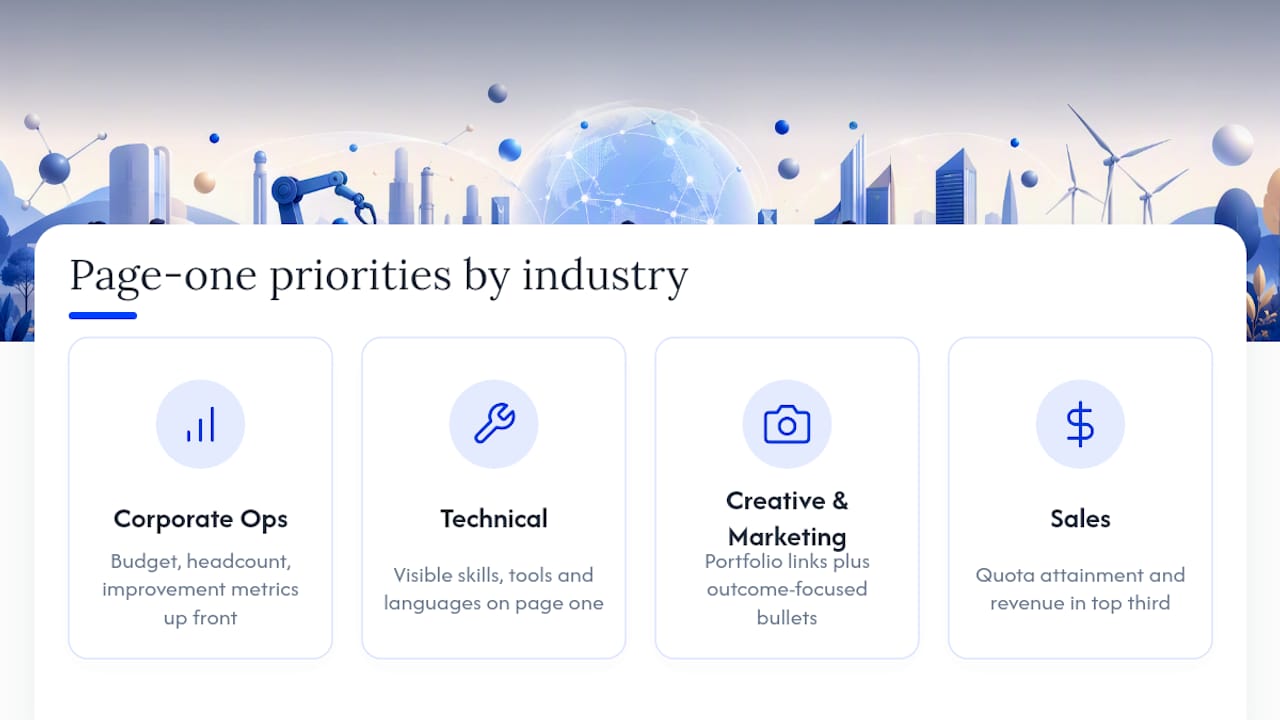
In corporate and operations roles, recruiters look for scope: budget size, headcount managed, and process improvements with numbers attached. Page one should front-load those metrics before anything else.
In technical and engineering fields, hiring managers and ATS filters alike are scanning for specific tools and languages. Your skills section carries more weight here, and it’s worth keeping a condensed version visible on page one even if a fuller list appears on page two.
In creative and marketing roles, portfolio links matter as much as the bullets themselves. Keep the resume focused on outcomes (campaigns launched, growth driven) and let a linked portfolio carry the visual proof, rather than trying to describe your design work in prose.
In sales roles, quota attainment and revenue numbers belong in the top third of page one, full stop. That’s the first thing a sales hiring manager checks, and burying it on page two costs you attention you won’t get back.
The common thread: identify what your specific industry’s readers scan for first, and make sure that information survives the cut to page one no matter how you structure the rest.
How Do You Balance Detail With Brevity Across Both Pages?
More space doesn’t mean more words. It means more room for the details that actually move the needle, and you still have to earn every line.
Treat each bullet as a cost, not a given. Before adding a line, ask whether it proves something the reader hasn’t seen yet. If it repeats a skill you’ve already demonstrated three bullets up, it’s not adding evidence, it’s adding length.
A useful discipline: cap most bullets at one line, two at most. If a bullet needs three lines to make its point, it’s usually trying to do too much. Split the idea, or cut the weaker half. The goal on both pages is density of proof, not density of words. A focused one-page approach applies the same logic in reverse: choosing what to keep, not stuffing in everything you’ve ever done.
How Do You Handle Employment Gaps or Career Changes on Two Pages?
Extra space actually helps here, since a gap or pivot often needs a sentence of context that a cramped one-page resume can’t afford.
For an employment gap, a brief functional summary near the top of page one can frame the story before a recruiter starts wondering. One line, like “Career break for caregiving, 2022 to 2023, followed by return to project management,” handles it directly without dedicating a whole section to explaining yourself.
For a career change, use your summary and skills section on page one to bridge your old field and your new target role, emphasizing transferable skills with specific examples rather than vague claims. Then let your two-page format work in your favor: keep recent, relevant experience prominent on page one, and let older, differently-focused roles live on page two where they still show work history without dominating the pitch.
The mistake to avoid either way is over-explaining. One clear sentence beats a paragraph of justification, and industry guidance from sites like Indeed consistently backs the idea that two pages are acceptable exactly when the content, gap explanations included, is genuinely necessary.
Why Content Beats Page Count in a Recruiter’s Eyes
Recruiters scan for proof, not padding. If your first page sells the fit, your second page’s job is simple: support it with more evidence, not repeat the pitch. A two-page resume that’s fully focused beats a one-page resume stuffed with filler every time, which is why we push clients to put their most persuasive material on page one and let page two do quieter, supporting work.
Digital review habits reward this. Recruiters scroll for free, so a readable, evidence-led second page rarely costs you attention it wouldn’t have cost you at one page.
— Resume
How Resume-match Helps You Decide Between One Page and Two
Deciding whether your resume needs a second page shouldn’t come down to guessing. AI resume analysis can evaluate your resume similarly to applicant tracking systems and recruiters, flagging whether your content merits additional length or is unnecessarily filled.
Career analysis reports can provide insights beyond length checks by identifying keyword gaps and suggesting which bullet points may need supporting metrics before submission to applicant tracking systems. They can help identify content that may be unnecessary or in need of strengthening.
You can run your resume through the free trial at Resume-match in about the time it takes to read this article, and get a prioritized list of edits rather than a vague sense that something’s off.
Sources
- A 2-page resume may be even better — here’s why (CNBC)
- When to Use Two Pages or More — Purdue OWL
- Can a Resume Be 2 Pages? (Zety guide)
FAQ
Is It Okay to Have a Two-Page Resume?
Yes, once you have 10+ years of experience, a technical or senior role, or credentials that require space, a two-page resume is widely accepted as long as every line adds real evidence.
Are Two Pages Better Than One for a Resume?
Neither length is inherently better. Research covered by CNBC suggests two pages can outperform one when the extra space holds measurable accomplishments rather than filler.
How Do I Make My Resume Fit Two Pages?
Start with your most recent role’s strongest metric-driven bullets on page one, then use page two for earlier roles, certifications, and projects, keeping fonts, margins, and header formatting consistent across both pages. A tool like Resume-match can flag which existing bullets are worth keeping versus cutting as you rebuild the layout.
Should Resumes Be One Page in 2026?
Only for early-career candidates with under roughly 7 to 10 years of relevant experience. Beyond that threshold, Purdue’s career guidance and most career experts recommend two pages when the added content is genuinely necessary.
What’s the Biggest Mistake People Make With a Two-Page Resume?
Burying their strongest achievements on page two. The top third of page one needs your best proof, since a weak opening page means many recruiters never scroll far enough to see what’s on page two at all.