
Federal Resume Format: ATS-Ready Resume + AI Keyword Match
Federal Resume Format: ATS-Ready Resume + AI Keyword Match

Use a clean .docx or simple text-based PDF with standard headings so ATS software can parse your keywords and recruiters can scan your wins in seconds. That’s the core rule, and everything else in this guide builds on it.
Here’s what your resume needs, in order:
- File type: .docx (preferred by most portals) or a text-based PDF with no embedded images
- Layout order: Contact info, professional summary, work experience, skills, education
- File name: Use a simple format like
LastName-RoleName-Resumeand submit one file per application
Key Takeaways
A well-formatted, keyword-mapped resume in .docx or text-based PDF format is the single most reliable way to pass ATS parsing and reach a human recruiter.
| Point | Details |
|---|---|
| Choose the right file type | Use .docx or a text-based PDF; never submit an image-based PDF or scanned document. |
| Follow the formatting rules | Single column, standard headings, 10–12 pt body, 14–16 pt headings, no images or tables. |
| Map keywords before submitting | Extract repeated terms from the job description and place them in your summary, skills, and bullets. |
| Test parsing before you apply | Run an ATS or AI parse check to confirm contact info, job titles, and skills are extracted correctly. |
| Resume-match Career Probability Report | Scores your resume, flags keyword gaps, and provides salary benchmarking before you submit. |
Table of Contents
- Why a simple, ATS-friendly format wins with both software and hiring managers
- What does your formatting checklist look like?
- How do you map job-description keywords into your resume?
- How should you test parsing and submit your resume?
- What formatting and keyword mistakes cost applicants interviews?
- A before-and-after example that shows the real difference
- Why these recommendations are backed by real evidence
- How does a private-sector resume differ from a federal one?
- How should you list certifications and licenses on your resume?
- How do you work soft skills into your resume without losing ATS points?
- Why AI-driven keyword analysis is the practical choice
- Resume-match gives you keyword analysis, job matches, and a Career Probability Report
- Sources
Why a simple, ATS-friendly format wins with both software and hiring managers
Format affects both parsing accuracy and recruiter attention, and you need to satisfy both audiences at once. An applicant tracking system (ATS) reads your resume the way a search engine crawls a page: it looks for structured text, standard section labels, and recognizable keywords. When your layout is clean and linear, ATS software extracts contact details, job titles, skills, and certifications reliably. When it isn’t, those fields get dropped or misread, and your application may never reach a human.
The recruiter side of the equation is just as real. A hiring manager typically spends a few seconds scanning a resume before deciding whether to read further. Clear headings, consistent spacing, and readable fonts make that scan fast and favorable.
AI keyword analysis is where these two goals meet. Resume-match analyzes your resume against a target job description, surfaces the exact phrases and acronyms the employer used, and shows you where your document is missing them. That means you’re not guessing which terms matter; you’re working from data.
Pro Tip: Keep your font to Calibri, Arial, or Times New Roman at 10–12 pt for body text and 14–16 pt for headings. Avoid images, text boxes, and decorative elements entirely. What looks polished in a design app often looks like a blank field inside an ATS.
What does your formatting checklist look like?
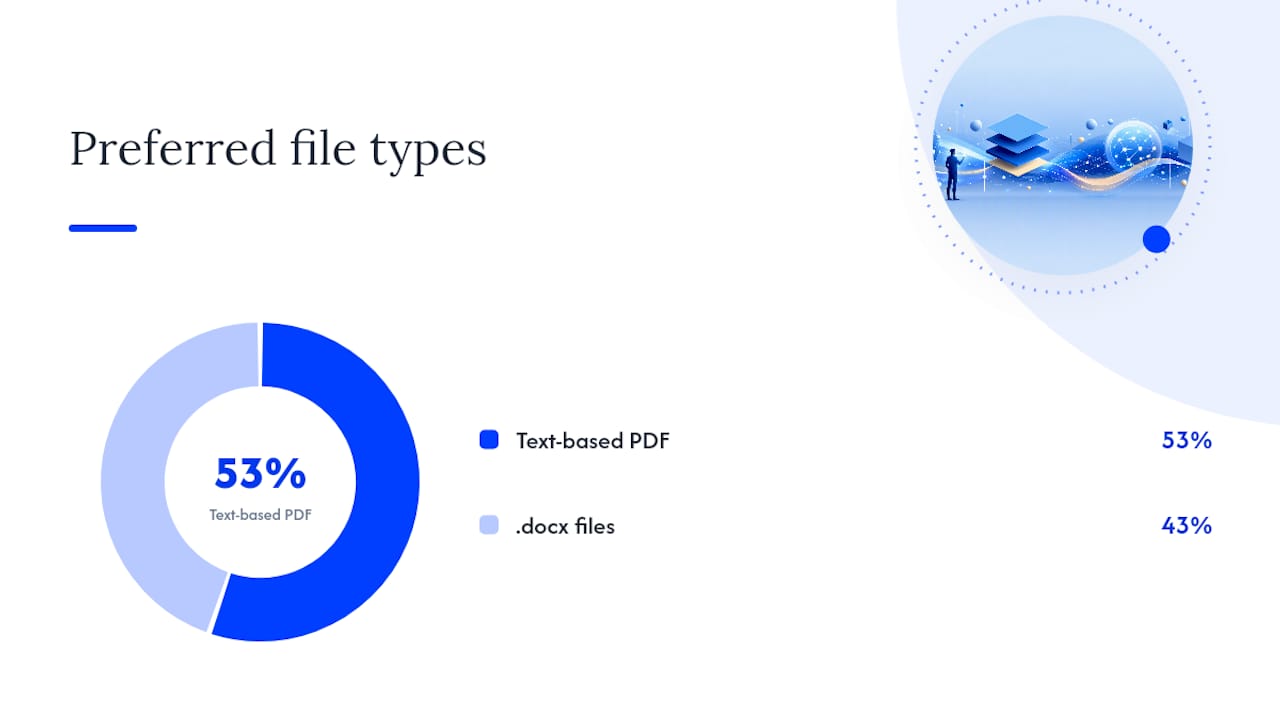
A complete formatting checklist covers file type, fonts, headings, section order, resume length, and file naming. According to Forbes, experts recommend simple, text-based PDFs (53%) or .docx files (43%), with body text at 10–12 pt and headings at 14–16 pt, and a length of one to two pages for most roles.
| Formatting Item | Recommended Setting |
|---|---|
| File type | .docx or text-based PDF (no image-based PDF) |
| Body font | Calibri, Arial, or Times New Roman |
| Body size | 10–12 pt |
| Heading size | 14–16 pt |
| Section labels | Work Experience, Skills, Education (standard terms) |
| Layout | Single column, reverse chronological |
| Resume length | 1 page (under 5 years experience); 2 pages (senior roles) |
| File name | LastName-RoleName-Resume |
What to avoid: Headers and footers are a common trap. Many ATS platforms skip content placed in those zones, so your phone number or LinkedIn URL may vanish entirely. Two-column layouts look sharp in Word but often get read left-to-right across both columns by parsing software, scrambling your job titles and dates. Tables inside the body carry the same risk.
Keep dates consistent throughout: “January 2022 – March 2024” in one entry and “01/22–03/24” in another creates parsing confusion. Pick one format and use it everywhere.
For technical roles in fields like cybersecurity, list certifications clearly in a dedicated Certifications section so both ATS and hiring managers spot them immediately.
How do you map job-description keywords into your resume?
Keyword mapping is the step that moves you from parsed to progressed. Here’s a repeatable workflow:
- Copy the job description into a plain text document and read it twice.
- Highlight repeated terms: job titles, required tools, hard skills, and any acronyms that appear more than once.
- Prioritize hard skills and role titles over soft skills; ATS systems weight these more heavily.
- List synonyms and acronyms side by side (for example, “MBA” and “Master of Business Administration”) and include both in your resume so you capture every variant the system might search for.
- Place keywords in three zones: your professional summary, your Skills section, and inside your experience bullets.
- Rewrite bullets to lead with an action verb, include the keyword naturally, and close with a quantified result.
Here’s a quick before-and-after to make this concrete:
Before: Helped manage social media accounts and worked on content.
After: Managed social media strategy across Instagram and LinkedIn, growing combined follower count by 34% in six months.
The second version includes role-relevant keywords (“social media strategy,” platform names), a quantified result, and an action verb. An ATS scores it higher; a recruiter reads it faster.
Pro Tip: Read your bullets aloud after adding keywords. If a phrase sounds forced or robotic, rewrite it. Keyword matching is about phrasing employers expect, not cramming terms into every sentence. AI tools help surface the right variants without the guesswork.
For roles where skills-based matching matters most, mapping transferable skills to the job’s exact language is often the difference between a match and a miss.
How should you test parsing and submit your resume?
Run a parse check before you submit. Paste your resume text into an ATS simulator or upload it to an AI analysis tool and confirm that your contact details, job titles, dates, and skills are extracted correctly. Missing fields at this stage mean missing fields in the recruiter’s database.
File selection rules:
- Choose .docx unless the job posting explicitly requests a PDF.
- Use a text-based PDF when the portal accepts it and you want to preserve formatting precisely.
- Never submit an image-based PDF or a scanned document.
Before you hit submit, run through this list: contact info parsed correctly, top five role keywords present in summary and bullets, file named LastName-RoleName-Resume, one file only (cover letter as a separate attachment if requested), and consistent date formatting throughout.
Resume-match’s Career Probability Report goes beyond a basic parse check. It scores your resume against role requirements, flags keyword gaps, and provides salary-fit estimates, giving you a prioritized list of edits rather than a vague “needs improvement” message. That’s the kind of specific feedback that actually changes your next application.
For a full walkthrough of the submission workflow, the job search workflow guide covers each step from upload to application tracking.
What formatting and keyword mistakes cost applicants interviews?
A few fixable errors filter out qualified candidates before a human ever sees their resume.
- Images and graphics: ATS systems read text, not visuals. A logo, headshot, or icon bar replaces readable text with a blank.
- Headers and footers: Content placed there is often skipped entirely by parsing software.
- Two-column layouts: Parsing reads left-to-right across columns, scrambling your experience.
- Tables in the body: Same parsing risk as columns; use plain bullet lists instead.
- Inconsistent dates: Mixing formats confuses date-extraction logic.
- Irrelevant keywords: Stuffing terms from unrelated roles lowers your match score on targeted listings.
- Missing role titles: If your current title doesn’t match the target role, add a “Target Role” line in your summary.
Red flags that mean you should re-run your parse check:
- Your keyword match score is below 60% for a role you’re qualified for.
- Key fields (phone, LinkedIn, most recent job title) are missing from the parsed output.
- Skills you listed don’t appear in the extracted skills section.
Quick fix for each: re-save as plain .docx, move contact info out of headers, convert tables to bullets, and run Resume-match’s AI analysis to catch gaps you missed.
A before-and-after example that shows the real difference
Small edits can increase parsed keyword matches and recruiter clarity at the same time.
Before (weak formatting, no keywords):
Responsible for helping the team with various tasks related to project coordination and communication.
After (ATS-ready, keyword-mapped):
Led cross-functional project coordination for a 12-person team, reducing delivery delays by 20% through weekly stakeholder communication and Asana-based task tracking.
What an AI analysis would flag: The “before” version contains zero role-specific keywords and no quantified result. The “after” version includes “project coordination,” a named tool (Asana), a team size, and a measurable outcome — all signals that improve both ATS scoring and recruiter interest.
The difference isn’t length. It’s specificity and keyword alignment. Resume-match surfaces exactly which terms are missing so you can make targeted edits rather than rewriting from scratch.
Why these recommendations are backed by real evidence
These guidelines come from two sources: documented ATS parsing behavior and recruiter scanning research. Indeed’s ATS guidance confirms that standard headings, single-column layouts, and avoidance of headers, tables, and graphics improve parsing accuracy. Forbes’ resume format research establishes the file-type and font benchmarks used in the checklist above.
Resume-match adds a live signal layer. Its AI analyzes your actual resume against real job listings and produces a Career Probability Report that combines keyword gap analysis, salary benchmarking, and career strategy in one place.
Pro Tip: Treat the Career Probability Report as your pre-submission audit. It tells you which keywords to add, which sections are underperforming, and what salary range your current resume positions you for — before a recruiter ever sees it.
How does a private-sector resume differ from a federal one?
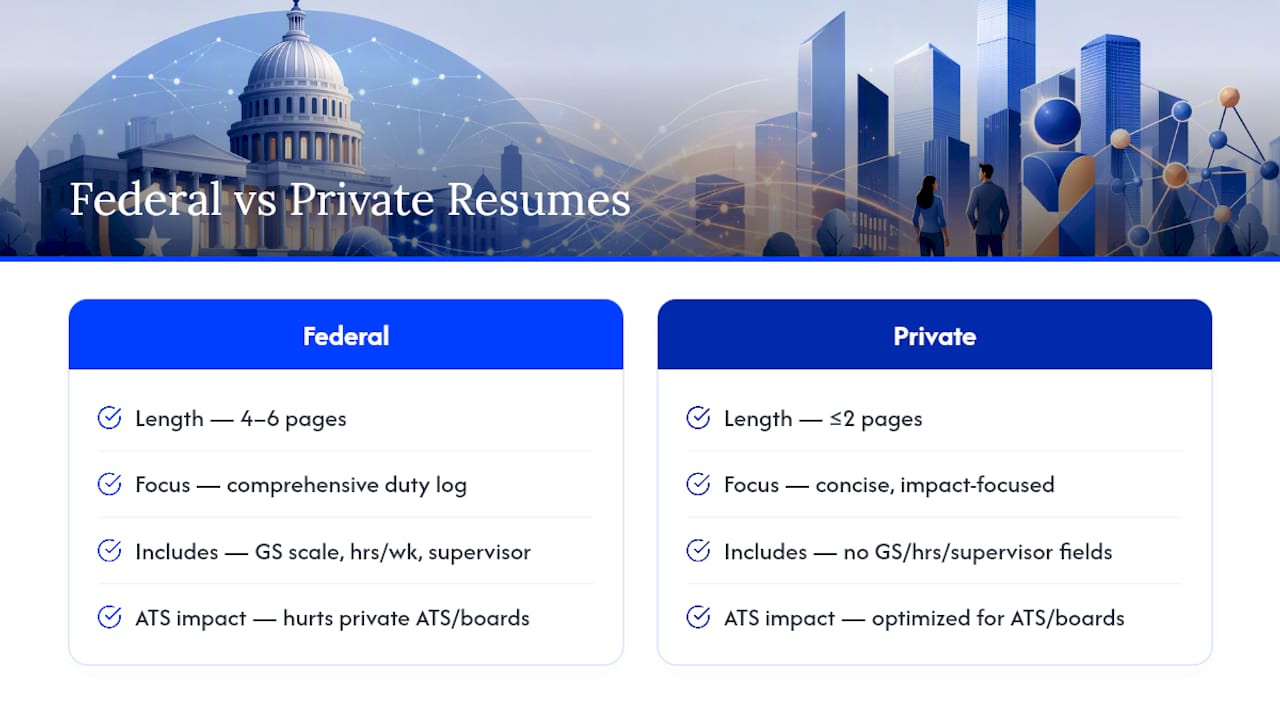
If you’ve ever Googled “federal resume format,” you’ve probably landed on guidance built for USAJOBS applications. Those resumes are a different animal: they typically run 4–6 pages, include detailed duty descriptions, GS pay scale references, hours per week, and supervisor contact information for every role. That format is required for federal hiring, but it actively hurts you on private-sector job boards and ATS platforms.
Private-sector and general job-board applications need the opposite approach: concise, keyword-dense, and no longer than two pages. Recruiters at private companies expect a tight summary of impact, not a comprehensive duty log. If you’re coming from a federal background or using government resume templates as a starting point, strip the excess detail, cut the page count, and reframe duties as achievements with measurable outcomes.
The core formatting rules in this guide apply to private-sector applications. If you’re targeting federal roles specifically, USAJOBS has its own builder and format requirements that are separate from everything covered here.
How should you list certifications and licenses on your resume?
Certifications belong in their own clearly labeled section, placed after Skills or Education depending on how central they are to the role. For technical fields, mapping certifications to job keywords improves discoverability and helps recruiters understand your competency level at a glance.
Format each entry consistently: certification name, issuing organization, and year earned. Include both the acronym and the full name on first mention (for example, “PMP — Project Management Professional, PMI, 2024”) so ATS captures both variants. If a certification is in progress, note the expected completion date rather than leaving it vague.
For roles where hands-on work matters, such as cybersecurity or cloud infrastructure, lab projects and practical training can be listed under a “Projects” or “Labs” subsection within Certifications. That framing signals real-world competency, not just a passed exam.
How do you work soft skills into your resume without losing ATS points?
Soft skills rarely appear in ATS keyword searches the way hard skills do, but they still matter to the human reviewer. The solution is to show them through context rather than list them as standalone terms.
Instead of writing “strong communicator” in your Skills section, write a bullet that demonstrates it: “Presented quarterly performance reports to C-suite stakeholders, translating technical data into executive-ready summaries.” The soft skill is visible; the hard skill (data analysis, executive communication) is what the ATS scores.
Reserve your Skills section for hard skills, tools, platforms, and certifications. Let your experience bullets carry the soft-skill proof. That way, you’re not sacrificing keyword density for traits that an algorithm can’t verify anyway.
Why AI-driven keyword analysis is the practical choice
We built Resume-match because the gap between a qualified candidate and a hired one is often just a formatting or keyword mismatch — not a skills gap. AI-powered keyword extraction closes that gap fast. Upload your resume, get a keyword match in about 30 seconds, and see exactly where your document falls short against the roles you actually want. The Career Probability Report takes it further: salary benchmarking, gap analysis, and a career strategy you can act on today.
Resume-match gives you keyword analysis, job matches, and a Career Probability Report
Most job seekers spend hours tailoring resumes manually, guessing which keywords matter and hoping the ATS agrees. Resume-match replaces that guesswork with AI analysis that works in about 30 seconds.
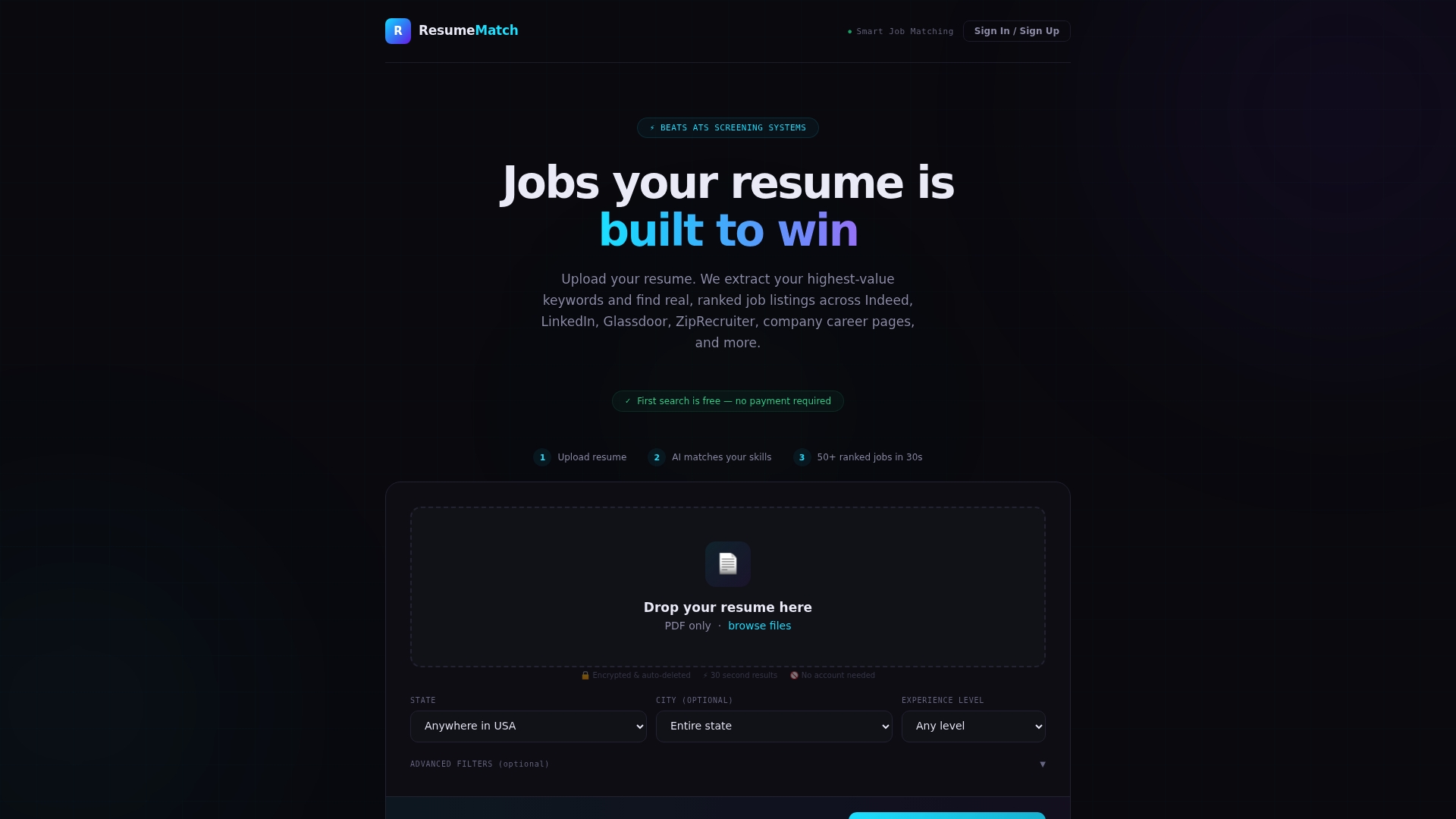
Upload your resume and Resume-match extracts your keywords, matches you to tailored listings across multiple job boards, and generates a Career Probability Report that shows your resume score, salary fit, and the specific gaps holding you back. You get the keyword map, the job matches, and the strategy in one place — no spreadsheets, no manual job-board hunting.
The free trial gives you full access for 72 hours. Resume-match and see your Career Probability Report before your next application goes out.
Sources
- The Resume Format To Beat ATS And Get Hired In 2026
- Entry Level Cybersecurity Jobs: Where to Apply and Get Hired