
ResumeUp.AI Alternatives: Best AI Resume Tools in 2026
ResumeUp.AI Alternatives: Best AI Resume Tools in 2026

If you want one tool that does more than write a resume, Resume-match is the strongest ResumeUp.AI alternative for job seekers who need real JD-matching, ATS alignment scoring, and tailored job listings in one place. That said, the right choice depends on what’s slowing you down most.
Here’s a quick shortlist by job-seeker need:
- ATS-first optimization: Tools like Jobscan and Rezi focus on keyword matching and ATS simulation. Good if your resume keeps getting filtered before a human sees it.
- Template and design focus: FlowCV, Zety, and Resume.io offer polished templates and clean exports. Best when visual presentation matters (creative roles, design, marketing).
- Resume-to-job matching suites: Resume-match, ResumeAI, and Jobright AI compare your resume to a specific job description and return an alignment score. The right pick if you’re targeting roles strategically.
- Job-tracking and application management: WonsultingAI and MyPerfectResume include built-in tracking. Useful when you’re sending numerous applications each week and losing track.
- Developer-focused builders: Flavored Resume and tools like it let you build from code or structured data. Niche, but powerful for technical roles.
The tools covered here include ResumeMatch, ResumeAI, Flavored Resume, Jobright AI, WonsultingAI, Zety, Resume.io, FlowCV, MyPerfectResume, Jobscan, and Rezi.
Table of Contents
- How top ResumeUp.AI alternatives compare at a glance
- Practical profiles of each alternative tool
- How to choose the right alternative for your situation
- How we picked and tested these categories
- Why matching your resume to a job description changes your results
- Key Takeaways
- When I’d pick each type of tool
- Resume-match: the all-in-one alternative worth trying
- Sources and further reading
How top ResumeUp.AI alternatives compare at a glance
Aggregator data groups alternatives into five clear categories: resume-to-job matchers, ATS-focused optimizers, template-first builders, job-tracking suites, and developer-focused builders. Each category solves a different bottleneck.

| Category | Best for | Key AI features | ATS optimization | Templates & export | App tracking | Interview / cover letter | Pricing shape | Ease of use | Privacy & data |
|---|---|---|---|---|---|---|---|---|---|
| Resume-to-job matchers | Targeted applications, career changers | JD comparison, alignment scoring, keyword extraction | Strong: gap analysis against specific JD | Moderate templates; PDF/DOCX export | Yes, in leading tools | Cover letter generation; some interview prep | Free trial + paid subscription | Moderate onboarding | Varies; look for explicit export/delete policy |
| ATS-focused optimizers | Heavy ATS environments, corporate roles | Keyword density analysis, ATS simulation | Very strong: pass/fail simulation | Limited design options; PDF/DOCX | Limited | Minimal | Freemium to paid tiers | Easy | Generally clear |
| Template-first builders | Visual roles, design, marketing | AI writing assist; limited JD matching | Moderate: basic keyword suggestions | Rich templates; PDF/DOCX/web | Rarely included | Cover letter templates | Free tier + paid plans | Very easy | Varies by vendor |
| Job-tracking suites | High-volume applicants | Application status tracking; some AI writing | Moderate | Standard templates; PDF export | Yes, core feature | Some include cover letters | Freemium to subscription | Easy to moderate | Check data-sharing terms |
| Developer-focused builders | Engineers, technical roles | Structured data input; markdown/JSON support | Moderate | Minimal design; PDF/DOCX/HTML | Rarely | Rarely | Often free or low-cost | Technical; steeper curve | Usually open-source or self-hosted |
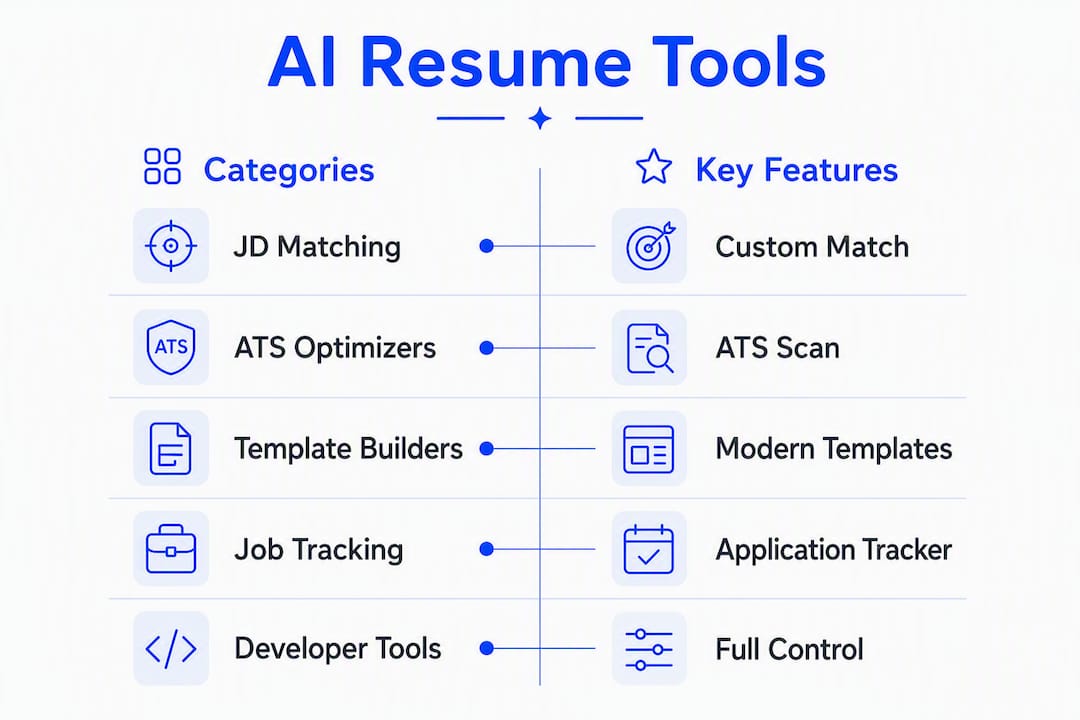
Pricing transparency and free-tier availability are among the most common differentiators job seekers cite when choosing between categories. Most tools offer a freemium entry point with advanced features behind a paywall.
Who should pick which category, in one line each:
- Resume-to-job matchers: Pick this if you’re applying to specific roles and want to know exactly how well your resume fits before you submit.
- ATS-focused optimizers: Pick this if your resume is getting rejected before a recruiter ever reads it.
- Template-first builders: Pick this if your resume looks dated and you need a visual refresh fast.
- Job-tracking suites: Pick this if you’re applying everywhere and losing track of where you stand.
- Developer-focused builders: Pick this if you want full control over structure and output format.
Practical profiles of each alternative tool
Resume-to-job matchers: ResumeMatch, ResumeAI, Jobright AI
Resume-match analyzes your resume, extracts keywords, and matches you to tailored job listings across multiple job boards in under 30 seconds. Its Career Probability Report includes salary insights, a resume gap analysis, and a career strategy. Application tracking and an optional agent service (where a human applies on your behalf) round out the offering.
- Pros: Full-stack matching from resume to job listing; Career Probability Report adds salary and gap context; optional done-for-you applications.
- Cons: Subscription required after a 72-hour free trial; not a design-first tool.
- Best for: Mid-career professionals and career changers who want targeted, data-backed applications.
- Export/integrations: PDF and DOCX export; multi-board job matching.
- Mobile: Available via browser on mobile.
ResumeAI focuses on AI-generated resume content with JD-matching suggestions. It’s a solid middle-ground tool: better at content generation than pure ATS simulation, but weaker on job-board integrations.
- Pros: Fast content generation; decent JD-alignment suggestions.
- Cons: Limited application tracking; no salary or gap analysis.
- Best for: Entry-level job seekers who need a strong first draft quickly.
Jobright AI combines resume building with job recommendations and a basic alignment score. Its job-discovery layer is a genuine differentiator, though the ATS simulation depth is lighter than dedicated optimizers.
- Pros: Job discovery built in; clean interface.
- Cons: ATS simulation less rigorous than specialized tools; limited export formats.
- Best for: Recent graduates exploring multiple roles simultaneously.
ATS-focused optimizers: Jobscan, Rezi
Jobscan is the most widely cited ATS optimizer. It runs your resume against a job description and returns a match score with specific keyword recommendations. Testing with a real job description is exactly how Jobscan is designed to be used, and it shows.
- Pros: Detailed keyword gap reports; LinkedIn profile scanning included.
- Cons: Design options are minimal; no job-board matching.
- Best for: Applicants targeting corporate roles with known ATS filters.
- Export: PDF and DOCX.
Rezi uses AI to write and format resumes specifically for ATS readability. It scores your resume in real time and flags formatting issues that could trip up parsers.
- Pros: Real-time ATS scoring; strong formatting guidance.
- Cons: Template variety is limited; no application tracking.
- Best for: Job seekers who know their target role and want maximum ATS pass-through.
Template-first builders: Zety, Resume.io, FlowCV
Zety offers over 20 professionally designed templates with an AI writing assistant. It’s one of the most polished template experiences available, though its JD-matching depth is limited.
- Pros: Excellent template variety; intuitive drag-and-drop editor; cover letter builder included.
- Cons: Weak JD-alignment scoring; no application tracking.
- Best for: Job seekers in creative or client-facing roles where visual presentation matters.
- Export: PDF and DOCX; web-hosted resume link.
Resume.io is a clean, fast builder with a strong template library and a simple interface. Good for getting a polished resume out the door quickly.
- Pros: Fast setup; good template quality; PDF/DOCX export.
- Cons: Limited AI depth; no JD comparison or tracking.
- Best for: Anyone who needs a presentable resume in under an hour.
FlowCV is free and highly customizable, with a focus on clean, modern design. It’s popular among designers and developers who want full layout control.
- Pros: Free; highly customizable layouts; PDF export.
- Cons: No AI writing assistance; no ATS guidance.
- Best for: Designers and visual professionals who want full design control.
Pro Tip: Before committing to a template-first tool, paste your target job description into a JD-matching tool and run a quick alignment check. A beautiful resume that misses the top five keywords in a posting won’t get past the ATS, no matter how good it looks.
Job-tracking suites: WonsultingAI, MyPerfectResume
WonsultingAI combines resume building with a job application tracker and career coaching features. Application tracking is its strongest differentiator for high-volume applicants.
- Pros: Integrated tracking; coaching resources; cover letter tools.
- Cons: AI writing quality is inconsistent; limited JD-matching depth.
- Best for: Job seekers sending dozens of applications a month who need a system.
MyPerfectResume is a long-standing builder with a guided step-by-step process, pre-written content suggestions, and basic tracking features.
- Pros: Guided builder lowers the barrier for first-time resume writers; large content library.
- Cons: Subscription model can feel restrictive; limited AI sophistication.
- Best for: Entry-level job seekers or those returning to the workforce after a gap.
Developer-focused builders: Flavored Resume
Flavored Resume lets technical users build resumes from structured data formats, giving full control over content and layout. It’s a niche tool, but for engineers who want a resume that reflects their technical precision, it fits.
- Pros: Full structural control; clean output; often free or open-source.
- Cons: No AI writing assistance; no ATS guidance; steep learning curve for non-technical users.
- Best for: Software engineers and developers who want a no-frills, highly customized output.
- Export: PDF and HTML.
How to choose the right alternative for your situation
Pick the category that solves your single biggest job-search bottleneck. That one decision narrows your options faster than any feature checklist.
If you’re entry-level or returning to the workforce, start with a template-first builder or a guided generator. Your priority is getting a clean, complete resume out the door. JD-matching matters less when you’re applying broadly to build experience.
Mid-career professionals and career changers have the opposite problem. You likely have a strong background, but your resume may not be translating your skills into the language of your target role. That’s where skills-based matching and JD-alignment scoring pay off. A tool that compares your resume to a specific posting and returns a gap analysis will tell you exactly what to rewrite.
For high-volume applicants sending dozens of applications a week, tracking is the priority. Without it, you’ll lose visibility into where you stand, which roles need follow-up, and which versions of your resume are performing. Zapier’s buyer guidance makes this point directly: match the tool to your primary workflow bottleneck, not to the longest feature list.
When evaluating any tool, ask three questions before subscribing. Can it compare your resume to a specific job description and return an alignment score? Does it offer application tracking, or will you need a separate system? Can you export your data in PDF and DOCX, and does the tool have a clear data-deletion policy?
Watch for these red flags: no export options, vague privacy terms, no ATS guidance beyond generic keyword suggestions, and pricing that hides the real cost behind a free tier that locks your resume behind a paywall.
Pro Tip: Paste the same job description into two different tools and compare the alignment scores and suggested edits side by side. The tool that returns clearer, role-specific action items is the one worth paying for.
How we picked and tested these categories
We evaluated tools by JD-matching depth, ATS simulation accuracy, template quality, export options, tracking features, pricing transparency, and privacy policies.
- Resume import and upload: We tested how each tool handles an existing resume (PDF and DOCX upload, LinkedIn import where available).
- JD comparison: We pasted a real job description into each tool and measured whether it returned a meaningful alignment score or only generic keyword suggestions.
- ATS simulation: We checked whether the tool simulates an ATS pass/fail or simply flags keyword density.
- Export to PDF and DOCX: We verified that both formats were available without a paywall.
- LinkedIn import/export: We noted whether LinkedIn data could be imported to pre-fill the resume and whether a LinkedIn-optimized output was available.
- Application tracking: We confirmed whether tracking was built in or required a third-party integration.
- Pricing transparency: We checked whether the full pricing structure was visible before sign-up.
- Privacy and data handling: We looked for explicit data-retention policies, export options, and account-deletion capabilities, following best practices for data portability.
Rating axes used: JD-matching accuracy, ATS guidance depth, template quality, tracking features, pricing transparency, and privacy clarity.
Scope note: We tested user-facing features and basic ATS matching using publicly available job descriptions. We did not conduct enterprise security audits or test API integrations at scale.

Why matching your resume to a job description changes your results
Tools that compare a resume to a specific job description and return an alignment score produce more targeted edits and higher ATS relevance than tools that only suggest generic keywords.
Grammarly’s Resume Builder illustrates this well: it highlights relevant skills, identifies gaps versus a job description, and returns an alignment score so you can see exactly how well your resume fits the role before you apply. That’s a fundamentally different process from adding keywords to a blank template.
The distinction matters because resume optimization and resume generation are not the same thing. Generation produces a document. Optimization compares that document to a target and tells you what to change. The best AI resume tools do both, but most tools on the market lean heavily toward generation and offer only surface-level optimization.
For career changers, this gap is especially costly. If your job title doesn’t match the role you’re targeting, a generic keyword tool won’t bridge that gap. A JD-matching tool that reads your actual experience and maps it to the language of the target role is what moves the needle. Resume-match’s personalized job-matching approach is built around exactly this use case.
Understanding how AI is used on the hiring side also helps here. Recruiters use JD-matching algorithms to screen candidates before a human ever reads the resume. Optimizing against the same logic they use isn’t gaming the system. It’s speaking the same language.
Key Takeaways
The strongest ResumeUp.AI alternatives solve a specific bottleneck: JD-matching for targeted applications, ATS simulation for keyword-heavy corporate roles, templates for visual roles, or tracking for high-volume job hunts.
| Point | Details |
|---|---|
| Match the tool to your bottleneck | Pick by your biggest gap: JD-matching, ATS filtering, design, or application volume. |
| JD-alignment scoring matters most | Tools that compare your resume to a specific posting return more targeted edits than generic keyword adders. |
| Tracking is non-negotiable at volume | Sending 20+ applications a week without a tracker means losing visibility into follow-ups and performance. |
| Privacy and export options are a real filter | Look for explicit data-retention policies and the ability to export or delete your data before subscribing. |
| Resume-match covers the full stack | Resume-match matches your resume to job listings, produces a Career Probability Report, and includes application tracking in one platform. |
When I’d pick each type of tool
My guiding principle: the tool that solves your current bottleneck is the right tool, not the one with the longest feature list.
If I’m just starting out and need a clean resume fast, I’d go template-first. FlowCV for free, Zety if I want a more guided experience. The goal is a complete, presentable document, not a perfectly optimized one.
If I’m switching careers, JD-matching is the only thing I’d prioritize. My job title won’t match the role I’m targeting, so I need a tool that reads my actual experience and maps it to the language of the posting. Resume-match’s Career Probability Report is built for exactly that scenario, and the gap analysis tells me what to rewrite rather than leaving me guessing.
If I’m in a high-volume application phase, sending applications daily, I’d make tracking the baseline requirement. A tool without it means I’m managing a spreadsheet on the side, which defeats the purpose of using AI at all.
For technical roles, Rezi or Jobscan handles ATS simulation well. For developers who want full structural control, Flavored Resume is worth the learning curve.
The scenario I see most often: someone uses a template-first builder, gets a great-looking resume, and then wonders why they’re not getting callbacks. The answer is almost always JD-alignment. The resume looks good but doesn’t speak the language of the specific role. Running a quick alignment check with a JD-matching tool before submitting takes five minutes and can change the outcome entirely.
Resume-match: the all-in-one alternative worth trying
Most job seekers end up using two or three tools: one to build the resume, one to check ATS compatibility, and a spreadsheet to track applications. Resume-match replaces this stack.
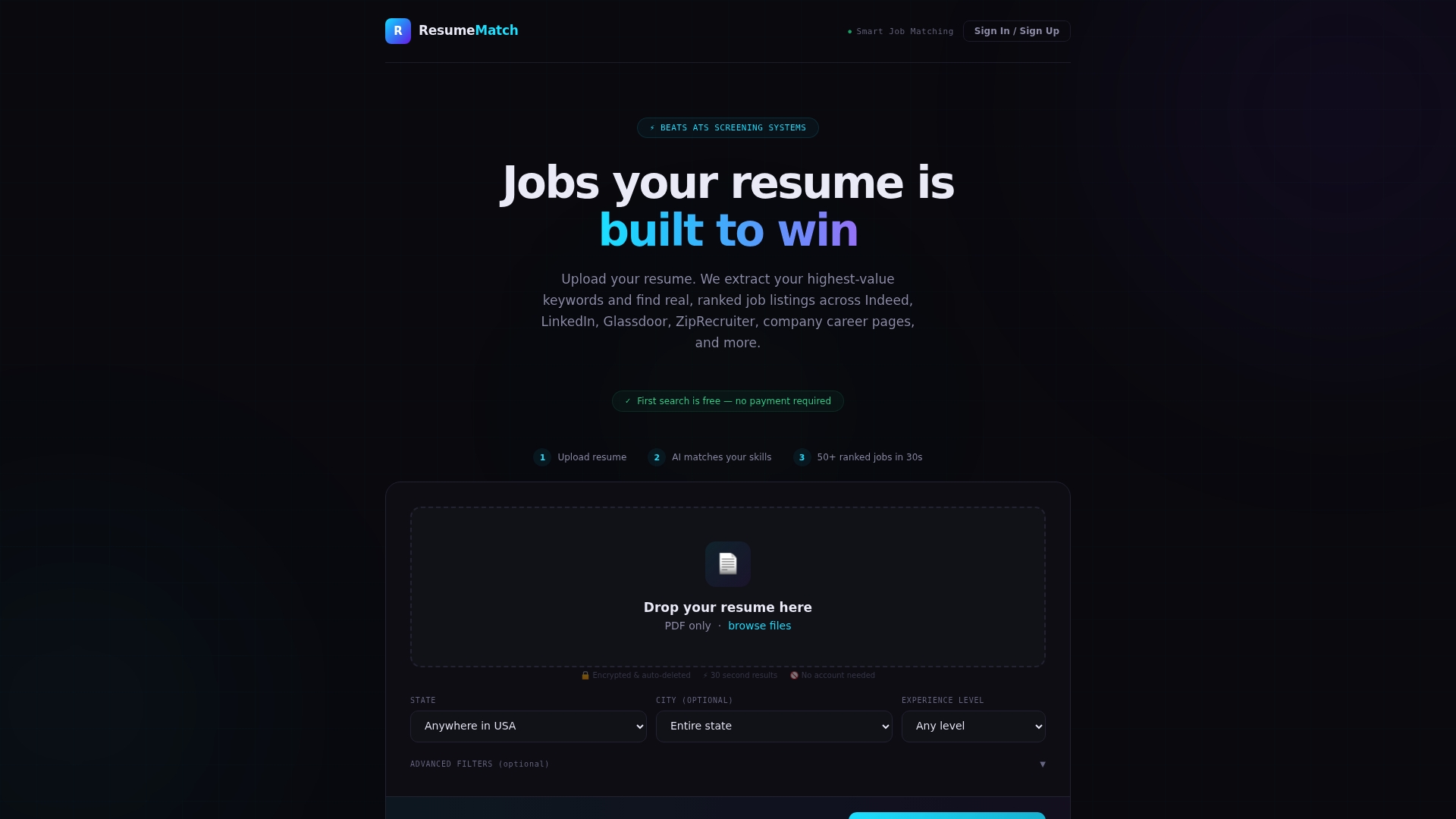
Resume-match analyzes your resume, extracts the keywords that matter, and matches you to tailored job listings across multiple job boards in under 30 seconds. The Career Probability Report goes further than a simple score: it includes salary insights, a resume gap analysis, and a personalized career strategy. Application tracking is built in, so you’re not managing a separate system. For job seekers who want someone else to handle the applications entirely, the optional agent service does the applying on your behalf.
Privacy matters here. Resume-match gives you clear data-export options and account control, so your resume data doesn’t disappear into a black box.
Start your 72-hour free trial at Resume-match and run a JD-alignment check on a real job posting. You’ll see exactly how your resume stacks up against the role before you apply.
Sources and further reading
The sources below back the claims in this article. Check the JD-alignment features and testing methodology in the linked pages for deeper verification.
| Source | What it covers |
|---|---|
| Grammarly Resume Builder | JD-alignment scoring, gap analysis, ATS relevance methodology |
| Zapier: Best AI Resume Builders | Buyer guidance, tool selection by workflow, testing with real JDs |
| SaaSHub: ResumeUp.AI Alternatives | Feature comparison filters, pricing shapes, privacy considerations |
| AIChief: ResumeUp.AI Alternatives 2026 | Category groupings, free vs. paid tiers, specialty tool breakdowns |
| Uneed: Best ResumeUp.AI Alternatives 2026 | Winner categories by use case, free and paid options |
| Capterra: ResumeUp.AI | User reviews, pricing, and feature ratings |
| Resume-match | JD-matching, Career Probability Report, trial details |
| Tekkr: AI in Hiring Efficiency | Recruiter-side JD-matching and AI screening context |
Last updated: 2026. If you find an outdated link or a pricing change, let us know through the Resume-match blog.